
Issue
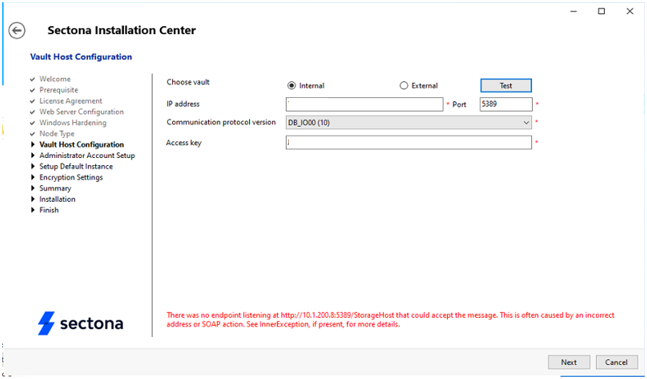
During the Sectona PAM installation process, you may encounter an error in the “Vault Host Configuration” step.
Error: "There was no endpoint listening at http://<IP_Address>:/StorageHost that could accept the message. This is often caused by an incorrect address or SOAP action."
Cause
-
“Sectona Vault Storage” Service is not running.
-
The IP address or port configured in the Sectona Installation Center is incorrect.
Resolution
Step 1: Verify the Vault Storage Service
-
Log in to the server where Sectona Vault is installed.
-
Open the Services application:
-
Press Windows + R.
-
Type “services.msc” and press Enter.
-
-
Locate Sectona Vault Storage Service.
-
Check the service status:
-
If Stopped, right-click the service and select Start.
-
If Running, right-click the service and select Restart.
-
Step 2: Confirm the IP Address and Port
-
Verify that the IP address and port configured in the Sectona Installation Center match the Vault configuration.
-
IP Address: Ensure it matches the server hosting the Vault service.
-
Port: The default port is “5839”, unless configured otherwise.
-
-
In the Sectona Installation Center, click Test to verify connectivity.
Step 3: Verify the Communication Protocol
-
In the Sectona Installation Center, verify the selected communication protocol version is “Default: DB_1000(1)”.
-
If you're unsure which protocol version to choose, refer the Sectona documentation or contact Sectona Support.
-
Make sure there are no network firewalls or antivirus software blocking the Vault service.
-
Verify that the Vault server has sufficient resources (CPU, memory) to run the service.