
Issue
You may encounter a case where starting an RDP session via the launcher causes the launcher to close shortly after opening and show a “Disconnected” status. The same device connects successfully using the RDP over Browser option.
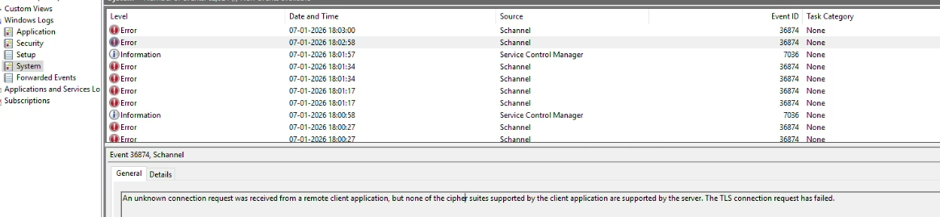
Error: “A TLS-related error occurred on the target windows server.”
Cause
-
This issue may occur due to a TLS protocol mismatch between the end user's device and the target server during launcher-based RDP sessions. Ensuring TLS protocol compatibility between both endpoints can help resolve the connection failure.
-
In browser-based RDP sessions, the PAM server establishes the RDP connection with the target server. In launcher-based sessions, the end user's local RDP client connects directly to the target server, resulting in a different TLS negotiation path.
-
In this scenario, the launcher-based session failed from a Windows 11 device but worked from a Windows 10 device, indicating a possible TLS compatibility issue.
Resolution
-
Verify that TLS protocol versions and cipher suites are compatible between:
-
End-user devices
-
Target servers
-
-
For environments using Windows Server 2019, verify that TLS settings comply with the server's supported protocols and are not overridden by security hardening or compliance policies. Refer to Microsoft's guidance on TLS 1.3 support in Windows Server 2019.
-
After applying the required configuration changes, restart the relevant services.
-
Re-test the RDP session using the Sectona Launcher to verify that the connection succeeds.